Support through Professional Community

8. Professional Practice – The teacher participates collaboratively in the educational community to improve instruction, advance the knowledge and practice of teaching as a profession, and ultimately impact student learning.

8.1 Participating in a Professional Community – Relationships with colleagues are characterized by mutual support and cooperation.

The eighth standard of the Internship Performance Criteria emphasizes the importance of participating in a professional educational community to advance student learning. It is important for teachers, especially new ones, to have a support network of other teachers, administrative staff, librarians, parents, and online communities to learn from and develop professionally. Regularly attending workshops and reading about the latest research-based instructional strategies is important to grow as a teacher.

Throughout my internship, I have attended grade-level team meetings to discuss curriculum, potential unit and lesson plans, and ways to assess student learning. One way I have been supported by my mentor and colleagues is by exploring a new curriculum for English Language Arts by the Collaborative Classroom that was approved for implementation at my school next year (see Figure 1).

Figure 1 - CCC Learning Hub Curriculum

Figure 1 – CCC Learning Hub Curriculum

As a third-grade team, we collaborated one day when there was an early dismissal and I experienced exploring the unit for fiction writing. We all agreed to use a specific rubric to evaluate the students’ fiction writing (see Figure 2). Together we modified it to fit our classroom needs.

Figure 2 - Fiction Writing Rubric

Figure 2 – Fiction Writing Rubric

Another way my colleagues and I supported each other was by sharing resources for the next unit about poetry. I borrowed an instructional guide for poetry from another 3rd grade teacher and used many of the lessons from it to teach types of figurative language to my students.

According to the U.S. Department of Education (2010), “half of teachers leave the profession within the first five years” (p 39). This is partly due to the lack of a support network of other educators and high amounts of stress as brand new teachers navigate the first few years of teaching. One way new teachers can be more successful is to build a support network around them. The U.S. Department of Education (2010) discusses the practice of “connected teaching” in which “teachers engage in personal learning networks (PLNs) that support their own learning and their ability to serve their students well” (p 40).

I am fortunate to have been placed in a school that has dedicated teachers that support each other to make sure we are doing what is best for our students. I am always willing to help my mentor and colleagues and want to support them too as I grow into this new profession. I have learned that it truly takes a village to teach children and without my colleagues’ support, I would not have been as successful teaching our poetry unit. In the future, I plan on continuing to talk to colleagues about different instructional strategies and ways they have taught poetry. I also plan to join an online community where teachers share lesson plan ideas and other resources that can help me engage students and support their learning in the best way possible.

Reference:

U.S. Department of Education, Office of Educational Technology. (2010). Transforming American Education: Learning Powered by Technology. Washington, D.C.

Reflecting on Teaching

2. Instruction – The teacher uses research-based instructional practices to meet the needs of all students.

2.3 Reflecting on Teaching – Teacher makes an accurate assessment of a lesson’s effectiveness and the extent to which it achieved its instructional outcomes and can cite general references to support the judgment.

The second standard of the Internship Performance Criteria emphasizes the importance of using research-based instructional strategies to meet the needs of all students. Reflecting on teaching is one critical component of this standard. It is important for teachers to constantly reflect on how lessons went and what could have been done differently or more efficiently to better meet the needs of the students. As I continue through my internship, it is important for me to reflect on my lessons and whether students were engaged, how well they understood the lesson, and steps I need to take for the next lesson.

I created several math lessons to begin teaching a unit about equivalent fractions. These lessons were based on research I had learned in my Elementary Math Methods class. Empson & Levi (2011) suggest letting students explore the concepts on their own first before being directly given methods or algorithms of solving problems. The theory is that students will learn better if they come to understand the concept through real world problems and classroom discussions. According to Empson & Levi (2011), effective teaching practices include “Posing problems to children without first presenting a strategy for solving the problems; choosing problems that allow children to craft a solution on their own; and facilitating group discussions of children’s strategies” (p. 10).

I started my first lesson by giving students an open-ended question with little instruction on how to solve the problem. Below is a portion of my lesson plan (Figure 1).

Figure 1 – Open-Ended Math Lesson Task

At the end of the lesson I had students complete an exit ticket. The sample exit ticket below (Figure 2) shows that this student thinks they understand the concept since they indicated a 5 for understanding the learning target, however, their answers to questions 1 and 2 did not support their high self-assessment score.

Figure 2 – Sample Math Lesson 1 Exit Ticket

As I proceeded to teach the second lesson, I used a similar format of giving students a problem to solve and allowing them to solve in whatever way made sense to them. Below is an exit ticket from my second lesson (Figures 3a & 3b) showing that this student really needs help and doesn’t understand the learning target.

Figure 3a – Sample Math Lesson 2 Exit Ticket

Figure 3b – Sample Math Lesson 2 Exit Ticket

Many students struggled with the exit ticket questions and the average “understanding the LT rating” for lesson 2 was 2.9. While I was teaching these lessons, I realized that my students were not ready to be given open-ended questions without prior instruction on how to solve them. I saw students struggling with the question and not knowing what to do or how to get started. I thought about my teaching after both lessons and determined that I could no longer apply the research and theories discussed in my Elementary Math Methods class. Without this type of reflective thinking, I would not have thought about what to do differently for the next lesson so that more students are able to meet the desired instructional outcomes.

I have learned that reflecting on teaching is important for effective lesson planning and instruction. As a result, I modified my third lesson to include direct instruction and modeling first before giving students a problem to solve. I have also learned that theories or instructional ideas may not make sense to use with certain students or groups of students. Perhaps if students had been taught earlier in the year to expect to try to solve problems in their own ways first, they might have performed better during my lessons. This constant reflection will help me meet my students in their zone of proximal development and provide them with instruction better geared toward their abilities. I am confident that my students will greatly benefit from what I have learned. I will use the remainder of my internship to continue reflecting on my teaching and making sure I am meeting the needs of as many students as possible.

Reference:

Empson, S. B. & Levi L. (2011). Extending Children’s Mathematics: Fractions and Decimals. Portsmouth, NH: Heinemann.

Using Book Clubs to Differentiate Instruction

3. Differentiation – The teacher acquires and uses specific knowledge about students’ cultural, individual intellectual and social development and uses that knowledge to adjust their practice by employing strategies that advance student learning.

3.1 Demonstrating Knowledge of Students – Teacher recognizes the value of understanding students’ skills, knowledge, and language proficiency and displays this knowledge for groups of students.

The third standard of the Internship Performance Criteria emphasizes the importance of differentiation. It is important for teachers to be aware of the strengths and weaknesses of each student so that instruction can be tailored to groups of students on a similar level or even individual students. Every student is at a different intellectual level and differentiation allows for better instruction geared to exactly what the student needs. If teachers simply teach the same content to all students, regardless of ability, interest, or cultural awareness, students may be left behind.

A few weeks ago during my internship, I used the Teachers College Reading Level tests to determine the current reading level for several student in my class. This assessment analyzes a students’ reading ability, including oral reading rate, fluency, and comprehension. My mentor and I have used this information in order to create four book club groups, each at a different reading level. Blair, Rupley, and Nichols (2007) assert that “effective teachers use assessment to select instructional strategies appropriate to the desired students’ learning outcomes in relation to the students’ existing reading capabilities” (p 434). These different book clubs allow us to differentiate our instruction for groups of students.

I am currently leading two of the four book clubs: one group is reading about Sojourner Truth and the other is reading about Elijah McCoy (Figure 1). Each time we meet, students bring their reading notebooks and texts with them and the group shares what they learned from the reading assignment. By examining each student’s notebook (Figure 2), I can quickly tell which students have read the assigned pages from the text and which ones haven’t. Most recently, the assignment included reading four pages of the text and taking notes. However, several students had only written notes from the first two pages and did not have enough class time to finish reading the assignment. I plan on using this knowledge to only assign up to two pages of independent reading and note-taking as opposed to four.

Figure 1 – Books for Differentiated Instruction in Book Clubs

Figure 2 – Sample Student Notebook for Book Club

Now that I have the awareness of the level of each student in each of the book clubs, I can better determine how big of a reading assignment to give them to complete before the next book club meeting. I have learned that dividing a classroom into groups of reading levels can be an effective way to differentiate reading instruction. I realize that some students in the class may be reading at a much higher level than others, so it is important for teachers to recognize and be aware of those differences so that we can appropriately challenge students to reach for the next level in their zone of proximal development. In the future, I hope to build on my growing differentiation skills and transfer my knowledge to other subject areas.

Reference:

Blair, T. R., Rupley, W. H., Nichols, W. D. (2007). The effective teacher of reading: Considering the “what” and “how” of instruction. The Reading Teacher, Vol 60, 5, 432-438.

Professional Learning Networks

One of the biggest challenges facing today’s teachers is finding a support network of other dedicated educators who share research and ideas about teaching strategies, practices, and pedagogy. Having a strong, collaborative community is important for teachers to grow professionally. According to the U.S. Department of Education (2010), “half of teachers leave the profession within the first five years” (p 39). This is in part due to lack of support networks and the fact that many new teachers do not have technology skills or knowledge at their disposal.

As I considered these challenges, I wanted to determine how I could participate in an online learning community to grow my teaching practice and learn new teaching strategies. ISTE Standard 5 states that teachers should continuously improve their professional practice, model lifelong learning, and exhibit leadership in their school and professional community by promoting and demonstrating the effective use of digital tools and resources.

The U.S. Department of Education (2010) discusses the practice of “connected teaching” in which “teachers engage in personal learning networks (PLNs) that support their own learning and their ability to serve their students well” (p 40). Teachers potentially have many resources to build their professional practice including parents, other teachers, PLNs, online courses, and other professional experts in the field. Online learning communities can help combat the traditional isolation that new teachers suffer from and instead enable them to collaborate with peers and improve student learning through resource and research sharing.

Connected Teaching (U.S. Department of Education, 2010).

The research article “’Together we are better’”: Professional learning networks for teachers” summarizes a study where over 700 Pre-K-12 teachers answered questions related to their professional/personal learning networks (PLNs) and how they felt the PLN activities affected their teaching and student learning. The article asserts that PLNs are the preferred option for collaboration and resource sharing for these survey participants because of the informal nature and the availability of diverse experience and teaching strategies. Almost all participants reported modifying their teaching practices because of their interactions with PLNs. PLNs consist of a variety of systems, including personal teacher colleagues and various online resources such as Twitter, Edmodo, Google+, LinkedIn, and Edutopia. PLNs can support affective, social, cognitive, and identity aspects of teacher growth (Trust, Krutka, & Carpenter, 2016). Respondents also described PLNs as having a positive impact on student learning (Trust et al., 2016).

One of my colleagues shared an article that discusses three popular PLNs created for educators: Edmodo, Classroom 2.0, and The Educator’s PLN. These PLNs can provide instant access to information, support, advice, feedback, and collaboration opportunities (Trust, 2012). Classroom 2.0 is a pay-for-service that allows individuals to create their own web site that contains a networking space including chat rooms, discussion boards, profile pages for members, interest groups and many other tools. Classroom 2.0 also has a wiki, Twitter feed, Facebook page, and Diigo account for sharing bookmarked web sites. Educator’s PLN is similar to Classroom 2.0, but it is more member-focused. Edmodo is a large social networking site similar to Facebook. Members have profile pages and can participate in online conferences, join subject communities, share resources, ask questions, and solicit ideas.

Classroom 2.0 (Trust, 2012).

Trust et al. (2016) assert that PLNs offer teachers emotional support, flexibility for adapting their learning experiences, and opportunities for engagement, participation, and even a community that extend beyond the walls of schools. This vast array of online professional learning networks can be a great solution for growing my professional practice and learning how to be a better teacher.

References:

Trust, T. (2012). “Professional Learning Networks Designed for Teacher Learning.” Journal of Digital Learning in Teaching Education, 28, 4, 133-138.

Trust, T., Krutka, D. G., Carpenter, J. P. (2016). “Together we are better”: Professional learning networks for teachers.” Computers & Education, 102, 15-34. http://dx.doi.org/10.1016/j.compedu.2016.06.007.

U.S. Department of Education, Office of Educational Technology. (2010). Transforming American Education: Learning Powered by Technology. Washington, D.C.

Digital Citizenship Infographic

Digital Citizenship is an important topic for students to begin to understand at an early age. Early elementary school is an ideal time to begin talking about how students can use digital resources responsibly and safely. According to Ribble (2010), Digital Citizenship is more than just a teaching tool; it is a way to prepare students and technology users for a society full of technology. Digital Citizenship is defined as the norms of appropriate, responsible behavior with regard to technology use. Being a good digital citizen means that we respect, educate, and protect others (Ribble, 2010). ISTE Standard 4 states that teachers should advocate, model, and teach safe, legal, and ethical use of digital information and technology, as well as promote and model digital etiquette and responsible social interactions related to the use of technology and information (ISTE, 2017).

I created the infographic below using Piktochart and felt that elementary students would greatly benefit from a simple, yet information-filled poster that talks about digital communication, etiquette, and health, safety, and ways to deal with cyberbullying. Communication options have expanded rapidly in the past few decades, with people now communicating online via email, blogs, Facebook, Instagram, and Twitter to name a few. Ribble (2017) asserts that many users have not be taught how to make appropriate decisions when faced with so many digital communication options. Young children and teenagers are easily overwhelmed with so much access to instant communication.

Students also need to learn how to conduct themselves online, so I listed a few etiquette tips on my infographic. Often people act differently online than they do in person and it is difficult to tell when someone is being funny or serious. Treating others with respect and caring is just as important online as it is in the real world.

Finally, students should be aware of all the health risks associated with internet addiction and ways to use digital tools in a healthy and productive way. Parents should also be mindful of the amount of time their children are spending in front of screens and make sure they take frequent breaks and watch for signs of addiction. Cyberbullying is a related safety topic that has become a real problem the past decade. My infographic details a few tips for how my students can address when they feel they are being bullied online. The more our students know, the easier it will be for them to recognize cyberbullying and feel comfortable talking to a trusted adult about the issue.

As an elementary teacher, it will be my responsibility to teach my students about these digital citizenship topics and make sure they know how to become good digital citizens.

Piktochart Infographic

References:

Ribble, M. (2010). Raising a digital child. Away Magazine.

Ribble, M. (2017). Digital citizenship: Using technology appropriately [website]. Retrieved from http://www.digitalcitizenship.net/Nine_Elements.html.

International Society for Technology in Education (ISTE). 2017. ISTE Standards for Teachers [website]. Retrieved from http://www.iste.org/standards/standards/standards-for-teachers.

Effective Teacher-Student Relationships

5. Learning Environment – The teacher fosters and manages a safe and inclusive learning environment that takes into account: physical, emotional and intellectual well-being.

5.1 Creating an Environment of Respect and Rapport – Teacher-student interactions are friendly and demonstrate general caring and respect. Such interactions are appropriate to the age and cultures of the students. Students exhibit respect for the teacher.

Teachers must provide a safe learning environment that takes into account the physical, emotional, and intellectual well-being of all students. Managing a classroom and maintaining respect and caring for all will promote higher student achievement. Without a safe learning environment, students are less likely to participate and more likely to become disengaged from learning and behave inappropriately.

Demonstrating concern and caring for each student can help build a sense of community in the classroom. According to Marzano (2007), several behaviors with students can increase academic achievement including making eye contact and friendly gestures, smiling, encouraging, and generally increasing the amount of time devoted to each interaction. Figure 1 below illustrates the various effect sizes for each teacher behavior. Having the appropriate mixture of concern, cooperation, guidance, and control in the classroom can help maintain an effective relationship with students.

Teacher Interactions with Students Source: Marzano, R. (2007). The Art and Science of Teaching. Alexandria, VA: ASCD.

Figure 1: Teacher Interactions with Students; Source: Marzano, R. (2007). The Art and Science of Teaching. Alexandria, VA: ASCD.

During my internship so far, I have observed my mentor showing caring and compassion for students, as well as defusing potential problems and providing guidance. She accomplishes this through a variety of actions. One way is through setting expectations with students on appropriate behavior. For example, she has several posters on the wall that list how students want to feel at school (figure 2) and the acronym RULER, which stands for the social emotional learning curriculum that public schools use in my district (figure 3). She indicated that she discussed these expectations at the beginning of the year. She is also reviewing the classroom charter and the mood meter chart (figure 4) this week to reinforce the idea that students should feel safe and happy at school.

How students want to feel in class

Figure 2: How students want to feel in class

RULER: Social and Emotional Learning Curriculum

Figure 3: RULER is a Social and Emotional Learning Curriculum

Mood Meter Chart

Figure 4: Mood Meter Chart

Another way she promotes a safe and caring learning environment is by monitoring student behavior at all times. There is one student in the classroom that has anger management issues and I have observed her quickly helping the student calm down by either redirecting or having the student wait in the hall until calm enough to reenter the classroom. My mentor also makes eye contact and maintains composure in tense situations in order to calm down the student.

Through my observations so far, I have learned that promoting a friendly and respectful classroom is important for the teacher-student relationship. In my own interactions with students, I have smiled and made eye contact with them and shown appreciation if they complimented me on something. I have also shown an interest in what students have to say and even used humor when appropriate. In addition to these interactions, I also attended an after-school open house event related to World Cultures where I interacted with several students on a more informal basis.

Providing a safe and welcoming classroom environment can increase student learning. As I continue my internship, I hope to notice more ways I can demonstrate caring for students and discuss these ideas with my mentor.

References:

Marzano, R. J. (2007). The Art and Science of Teaching: A Comprehensive Framework for Effective Instruction. Alexandria, VA: ASCD.

Modeling Safe, Legal, and Ethical Use of Digital Information

ISTE standard 4 states that teachers should understand local and global societal issues and responsibilities in an evolving digital culture and exhibit legal and ethical behavior in their professional practices. There are several parts to this standard, but I will focus on one: teachers should advocate, model, and teach safe, legal, and ethical use of digital information and technology, including respect for copyright, intellectual property, and the appropriate documentation of sources.

As a teacher, it is important for me to understand rules around giving proper credit to sources, make sure I use Internet resources responsibly, and make sure I am being a good model for my students. One particular blog post I have found particularly useful is “The Educator’s Guide to Copyright, Fair Use, and Creative Commons.” The two basic rules are “1) You can’t use everything you find on the web and 2) There are resources you can use” (Burt & Waters, 2017). For example, images are one of the most problematic for people unaware of copyright laws. Photos for Class is a helpful website that automatically provides Creative Commons images with image attribution quickly and easily.

While I focused on one aspect of the standard, a colleague of mine focused on developing and modeling cultural understanding and global awareness by engaging with colleagues and students of other cultures using digital age communication and collaboration tool. McVeagh (2015) discusses creative ways to teach global awareness including Skype in the Classroom and Google Field Trip. For example, Mystery Skype “allows classes to play a guessing game with each other to try and figure out where each of the schools [on the Skype call] are located” (McVeagh, 2015). These tools seem useful for promoting global awareness and could serve as examples for how to safely interact with other people via the Internet.

According to Hollandsworth, Dowdy, and Donovan (2011), it takes an entire village to teach digital citizenship. Parents, teachers, librarians, administrators, and students themselves must learn how to proactively deal with the issue of digital citizenship. Many approaches currently in place in most schools are more reactive than proactive. For example, there are Internet filters and outright banning of cell phone and other devices. However, this doesn’t restrict student use of technology outside of school and we are doing our students a disservice by not educating them on how to safety, ethically, and legally use Internet content and electronic devices. Just like we teach students how to enter traditional society with basic concepts of legal, ethical, and moral conduct, we should teach them these concepts and the skills to use in the digital society as well.

Hollandsworth, Dowdy, and Donovan (2011) assert that research shows that middle school and beyond is too late to begin teaching digital citizenship because most students have already adopted their own rules for technology use (see figure 1). Furthermore, many states do not have state standards that encompass digital citizenship, therefore it is not stressed in various academic curricula. Educators need to take it upon themselves to force the issue and be proactive about teaching students as young as early elementary age what it means to be a digital citizen.

Figure 1 (Hollandsworth, R., Dowdy, L., Donovan, J. (2011). Digital citizenship in K-12: It takes a village. TechTrends, 55, 4, 37-47.)

Figure 1 (Hollandsworth, R., Dowdy, L., Donovan, J. (2011). Digital citizenship in K-12: It takes a village. TechTrends, 55, 4, 37-47.)

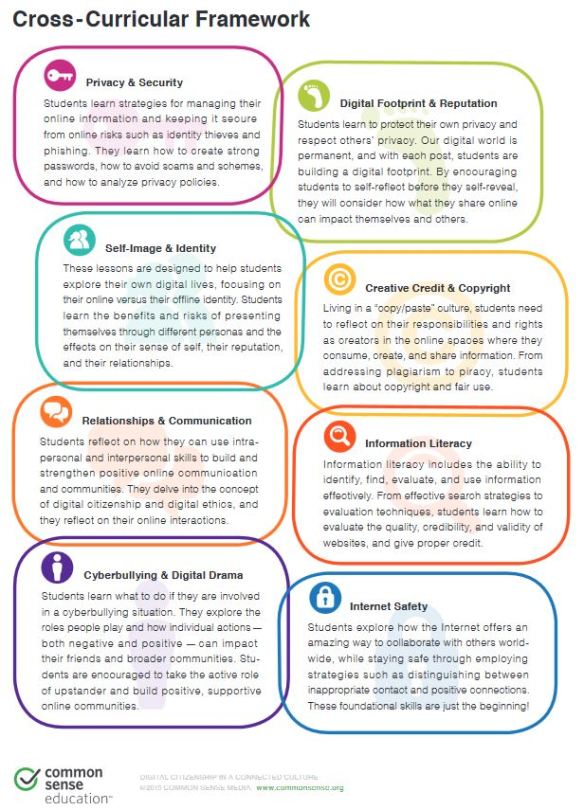
There are some curricula available online that address various topics related to digital citizenship. For example, Common Sense Media publishes a curriculum for grades K-12. It includes topics like self-image and identity, relationships and communication, cyber bullying and digital drama, and creative credit and copyright (see figure 2). One drawback I have to consider is the amount of time I will have as a busy elementary teacher to implement this type of additional curriculum. Perhaps I could use some ideas and embed them into the lessons I am teaching. For example, during a lesson about researching for writing a report, I could also teach students how to correctly cite and give credit for sources. I hope to keep these important topics in mind as I continue in my development as a teacher.

In the 21st century, all educators should work towards making sure students become good digital citizens. It really does “take a village.”

References:

Burt, R. & Waters, S. (2017). The Educator’s Guide to Copyright, Faire Use, and Creative Commons [web blog post]. Retrieved from http://www.theedublogger.com/2017/01/20/copyright-fair-use-and-creative-commons/

Hollandsworth, R., Dowdy, L., Donovan, J. (2011). Digital citizenship in K-12: It takes a village. TechTrends, 55, 4, 37-47.

McVeagh, R. (2015). 3 Creative Ways to Teach Global Awareness [web blog post]. Retrieved from https://www.commonsense.org/education/blog/3-creative-ways-to-teach-global-awareness

Using New Technologies to Communicate with Parents

It is important for teachers in any grade level to be aware of new and evolving technologies and processes. Living in the digital age of the 21st century, we have an obligation to make sure our students are knowledgeable about the Internet, computers, and electronic devices, and how to use them productively. Technological skills are important to have in a significant percentage of job settings including medicine, engineering, architecture, research analysts, software developers, and many other professions.

ISTE Standard 3 discusses how teachers should exhibit knowledge, skills, and work processes representative of an innovative professional in a global and digital society. Being able to transfer current knowledge to new technologies, to collaborate and communicate with the community using digital tools, and to model effective use of such tools to support research and learning are critical skills for all teachers to have.

As a future elementary teacher, I am especially interested in learning about the various ways to use technology to communicate with parents and students outside the classroom. Keeping open lines of communication with parents has been shown to have a positive effect on student learning and achievement. O’Brien’s Edutopia article (2011) discusses a survey done by the National School Public Relations Association that indicates parents clearly prefer Internet communications, including emails, an online parent portal, e-newsletters, websites, and a telephone/voice mail system. Face-to-face meetings with parents are especially important but digital tools can supplement this information. Knowing whether parents have easy access to email, computers, or other electronic devices is important.

According to Pescatore’s Edutopia article (2014), the first step to determining which digital tools to use is figuring out the classroom needs, resources available, and goals to be addressed. Understanding what parents want to know is essential to providing a tool that they will use and appreciate. A colleague of mine shared an interesting article about the characteristics of parent-teacher email communication. According to Thompson (2008), the most common email topic was student grades, followed by scheduling meeting dates and times, and health issues including obtaining homework while the student is gone. Thompson (2008) also concluded that parents and teachers emailed less frequently than one might expect, with teachers typically spending 30 minutes to an hour per week communicating with parents via email. Email can be convenient for communicating at any time when people are available, however if an immediate answer is required, email can potentially be slow if the teacher or parent is extremely busy.

Teacher-parent email topics by frequency (Thompson, 2008)

Teacher-parent Email Topics by Frequency (Thompson, 2008)

Remind could be a potential solution to this problem. Remind is a texting service that teachers and parents can use to communicate quickly. Remind does not require the sharing of phone numbers, so this information can remain private if necessary. Teachers can quickly send messages to parents reminding their students to finish an assignment or to return paperwork for a field trip.

Figuring out the purpose of the communication is another consideration. I began to wonder what other digital tools are there available to use besides email? Do I want to simply provide information to parents via a classroom website? Do I want students and parents to be able to contribute to the communication? According to Pescatore (2014), a few options for one-way communication tools include Pinterest, eNewsletters, and photo sharing sites. Two-way communication tools include blogs, Google drive, social media such as Facebook or Twitter, and even live-streaming applications such as Skype.

Kumar and Vigil (2011) assert that the Net generation, people born after 1984 who have grown up with digital technologies, should have the knowledge and skills to make the connection between technology, subject matter, and pedagogy, and be able to implement educational technology activities in the classroom. However, research indicates that undergraduates show limited or no transfer of technology familiarity to academic environments (Kumar & Vigil, 2011). Kumar & Vigil’s study surveyed 51 undergraduates in the college of education at a large private university and found that 98% used online videos, 68.6% used photo sharing, 52.9% used online forums, 47.1% used blogs, 40% used wikis and podcasts, and 32% used Google Docs in informal settings. However, respondents did not typically transfer this knowledge and use to educational settings. The graph below shows the large gap between using blogs, wikis, and podcasts informally and in educational settings.

Informal and Educational Use of Technologies (Kumar & Vigil, 2011)

Informal and Educational Use of Technologies (Kumar & Vigil, 2011)

I have maintained two personal blogs for informal use and this professional blog over the past decade, but I never thought about using a blog in an elementary classroom setting. The idea of creating a blog for my classroom and having my students involved in writing posts that parents can then read sounds interesting. I came across a blog written by a teacher and author that discusses ways to use technology in the classroom, including blogging. Ms. Ripp has written several posts about why students should blog in the classroom, how to do it, challenges you might face, and internet safety issues. She uses KidBlog, which seems like a safe, yet sophisticated way for students to blog about what they are learning and parents to observe.

I am very familiar with most digital tools mentioned above, however I haven’t thought much about using them in an educational setting. There is a lot of potential for richer activities for students to patriciate in that involve new technologies. On the continuum of integrating technology in education below, I believe I fit in the adaption and appropriation phases.

Continuum of Integrating New Technologies in Education (Kumar & Vigil, 2011)

Continuum of Integrating New Technologies in Education (Kumar & Vigil, 2011)

One issue will be determining which ideas are the best to focus on and implement properly and how much time I have to spend on these technologies. Another issue is making sure students don’t feel left out if they do not have internet access or access to digital devices at home. It is important to make sure we expose all students to the vast array of technologies available in the 21st century, so that they can be future researchers, engineers, and teachers for the next generation.

References:

Kumar, S. & Vigil, K. (2011). The net generation as preservice teachers: Transferring familiarity with new technologies to educational environments. Journal of Digital Learning in Teacher Education, 27, 4, 144-153.

O’Brien, A. (2011). What parents want in school communication [web article]. Retrieved from https://www.edutopia.org/blog/parent-involvement-survey-anne-obrien

Pescatore, G. (2014). Parent communication toolbox [web article]. Retrieved from https://www.edutopia.org/blog/parent-communication-toolbox-gwen-pescatore

Thompson, B. (2008). Characteristics of parent-teacher e-mail communication. Communication Education, 57, 2, 201-233. doi: 10.1080/03634520701852050

ISTE Standard 2: Design and Develop Digital-Age Learning Experiences and Assessments

ISTE Standard 2 states that teachers must design and develop digital-age learning experiences and assessments. Specifically, teachers should incorporate digital tools and resources to promote student learning and creativity, enable students to manage their own learning and assess their own progress, as well as address diverse learning styles.

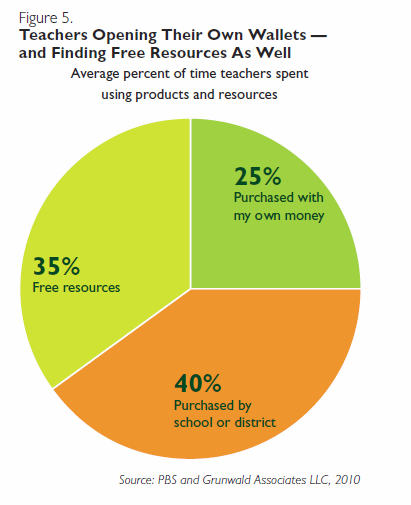
This complex standard has many facets and implies that digital tools are necessary for all teachers and students to use. One potential issue with this standard is that not all schools can afford to provide such expensive tools for each classroom or student. For example, iPads, laptops, Kindles, and other technology tools are incredibly expensive. However, according to a 2010 survey conducted by Grunwald Associates LLC and PBS, “teachers spend 60% of their time using educational resources that were either free or that they paid for themselves” (p. 6). Despite the cost and lack of funding, teachers seem determined to provide as many technological resources as possible for their students.

60% of teachers use free resources or pay for resources themselves

60% of teachers use free resources or pay for resources themselves

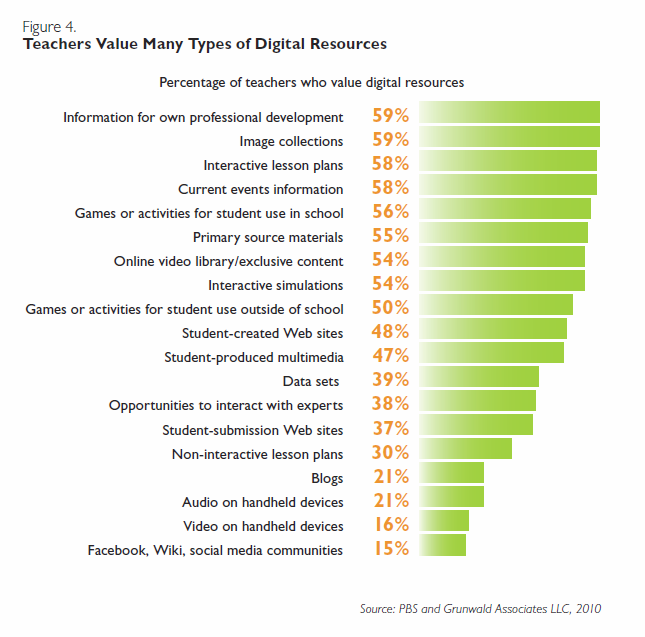
I have always enjoyed games and remember playing The Oregon Trail and Math Blasters in elementary school during computer lab period. This made me curious about how game-based learning could satisfy ISTE Standard 2. According to the survey, 56% of teachers value web-based interactive games or activities for student use in school and 54% of teacher report using Web-based interactive games (PBS & Grunwald Associates LLC, 2010).

Teachers Value Many Types of Digital Resources

Teachers Value Many Types of Digital Resources

I found an article on edutopia that discusses ways to use games to enhance learning for upper elementary and middle school students. Game-based learning isn’t simply students playing games in your classroom for fun. Nor do games substitute for the teacher. Games can be a useful AND fun activity that helps students get engaged with learning and relating games to the real world and real life events.

According to Farber (2016), games can be a shared experience, similar to taking the class on a field trip. An example is the game Minecraft and how students learn the mechanics of the game in order to survive. This can be related to how pilgrims had to understand their new environments when settling in a new area. Next he discusses games as text where the student would make choices that affect and tell a story. These stories can then be related to historical events that are similar. Finally, Farber (2016) talks about games as models. For example, the board game Pandemic illustrates how disease can travel via networks all around the world, which relates to how disease spreads during plagues like the Black Plague.

This article led me to search for benefits of game-based learning. In addition to games providing a different learning tool for addressing different learning styles, games provide motivation and engagement for students. Peters (2016) asserts that games include rules, definite objectives, measurable goals and competition, and promote a sense of achievement for all participants. Students have goals that they try to accomplish and assess their progress over time. Games also provide immediate feedback for students about whether or not they made a good decision. Peters (2016) also discusses how games promote cognitive growth, digital literacy, and skills development such as hand-eye coordination, spatial skills, and fine motor skills.

Another colleague suggested using a whiteboard called a Promethean board for interactive “calendar time” each day in order to satisfy ISTE 2. This whiteboard would provide students with a collaborative way to discuss the date and weather, as well as talk about the calendar and planning. While not a game by itself, I could see this tool benefiting student learning by providing a stable and predictable environment.

I think that games, whether web-based or not, can be an engaging and helpful tool for students to learn. It is important for game-based learning to incorporate all aspects of the Technological Pedagogical Content Knowledge (TPACK) framework in order for the activity to be as beneficial for students as possible. I will need further research to determine how to incorporate assessment methods into game-based learning.

TPACK Model

TPACK Model

References:

Farber, M. (2016). 3 Ways to use game-based learning [web article]. Retrieved from https://www.edutopia.org/article/3-ways-use-game-based-learning-matthew-farber

PBS & Grunwald Associates LLC. (2010). “Deepening Connections: Teachers Increasingly Rely on Media and Technology.”

Peters, J. (2016). 5 Main advantages of game-based learning [web article]. Retrieved from http://www.brighthubeducation.com/teaching-methods-tips/129304-advantages-of-game-based-learning/

ISTE Standard 1: Facilitate and Inspire Student Learning and Creativity

ISTE Standard 1 states that teachers should facilitate and inspire student learning and creativity. The standard further states that teachers should model creative thinking with technology and promote student reflection using collaborative tools in both face-to-face and virtual environments. As a future elementary teacher, I wanted to consider how my third grade students could use technology to enhance student learning and creativity during literacy instruction in particular.

One way to enhance literacy instruction is to use technology such as digital storytelling to assist students during various stages of the writing process such as planning, drafting, and revising. According to Robin (2008), digital storytelling involves combining information or stories with various types of multimedia including computer-generated text, videos, music, and images that can then be played on a computer, shared online, or even burned to a DVD. Digital storytelling can help promote technology skills including digital literacy, global literacy, technology literacy, visual literacy, and information literacy. As students participate in digital storytelling they “develop enhanced communication skills as they learn to conduct research on a topic, ask questions, organize their ideas, express opinions, and construct meaningful narratives” (Robin, 2008, p. 224).

One research study about the effectiveness of digital storytelling indicated that students thought more deeply about their story and were able to clarify their thoughts before and during the process (Sadik, 2008). Furthermore, “digital storytelling provided a unique opportunity for students to acquire new media literacy and IT skills” (Sadik, 2008, p. 502). The study also found that students were dedicated to the task and took pride in their digital stories (Sadik, 2008).

7 Elements of Digital Storytelling

7 Elements of Digital Storytelling

Writing narratives is an important skill for elementary students to learn. Many students struggle with planning before beginning to write. Once they start to write, they have a difficult time writing down all of their thoughts in the correct order and with an appropriate amount of detail. Bogard and McMackin (2012), explain how students can use technology at all stages of the writing process during writing workshop. First, students map out on paper the key points of their story with drawings of important events. Next, students can use Livescribe Pulse Smartpens that contain a camera and a microphone to record their drawings of various points in the story and also add audio narrative. Students collaboratively discuss their audio recordings of their stories and revise and edit. Finally, video editing software such as iMovie and PhotoStory can be used to provide visuals such as images, photos, video clips, and scanned pictures as a final creative touch to finish the personal narrative.

Click the link below for an example of a digital story that talks about how math is important in everyday life. While not an example of a personal narrative, the basic principles of digital storytelling are the same.

http://digitalstorytelling.coe.uh.edu/view_story.cfm?vid=93&categoryid=6&d_title=Mathematics

Another technology to consider for promoting student learning and creativity is using iPad apps for creating stories. A colleague of mine indicated that iPad apps such as Rory’s Story Cubes, Write About This, or Mad Libs could be useful for engaging students with technology to promote their literacy skills (Lee, 2013). I think that incorporating some iPad app use in my classroom would be a good way to make literacy fun for students who may not enjoy it much. However, I would want to carefully monitor student use of such applications to ensure that they are being used appropriately and productively.

I had never really considered using digital storytelling or apps in my future classroom. Now I believe these technology resources could be very useful for promoting student creativity, engagement, and collaboration. One shortcoming of using digital storytelling is the amount of time spent up front becoming familiar with the technology myself and then making sure students are able to effectively use it. I could see it being a very time-consuming process to implement in the beginning. In the long run however, this technology allows for significant redesign of a historically paper and pencil task of writing a narrative, which can greatly enhance student learning and creativity during literacy instruction.

References:

A Day Without Math [web video]. University of Houston Education. Retrieved from http://digitalstorytelling.coe.uh.edu/view_story.cfm?vid=93&categoryid=6&d_title=Mathematics.

Bogard, J. M. & McMackin, M. C. (2012). Combining traditional and new literacies in a 21st-century writing workshop. The Reading Teacher, 65, 5, 313-323. doi:10.1002/TRTR.01048 http://ezproxy.spu.edu/login?url=http://search.ebscohost.com/login.aspx?direct=true&AuthType=ip&db=a9h&AN=70857266&site=ehost-live

Lee, D. (2013). iPad apps for creating stories with primary children. Illinois Reading Council Journal, 42, 1, 23-27.

Robin, B. R. (2008). Digital storytelling: A powerful technology tool for the 21st century classroom. Theory Into Practice, 47, 220-228. doi:10.1080/00405840802153916

Sadik, A. (2008). Digital storytelling: A meaningful technology-integrated approach for engaged student learning. Educational Technology Research and Development, 56, 487-506. doi:10.1007/s11423-008-9091-8

The 7 Elements of Digital Storytelling [website]. University of Houston Education. Retrieved from http://digitalstorytelling.coe.uh.edu/page.cfm?id=27&cid=27&sublinkid=31.